Note
Device Trust’s REST-based API provides a simple way to programmatically read and interact with resources in your Device Trust account.
Full documentation
Creating an API key
Note
The Device Trust REST API uses token-based authentication. Device Trust administrators can obtain a token by creating an API Key entry. To create a key, follow these steps:
In the Device Trust admin console, click your user avatar in the upper-right corner.
In the dropdown menu, click Settings.
In the menu on the left, click Developers.
In the sub-menu that appears, click API Keys.
On the next screen, click Create New Key.
In the modal that appears, provide a name for the Key and the name of a Device Trust administrator who will be responsible for the API Key’s usage. Both of these values will appear in both the Audit Log and the Privacy Center.
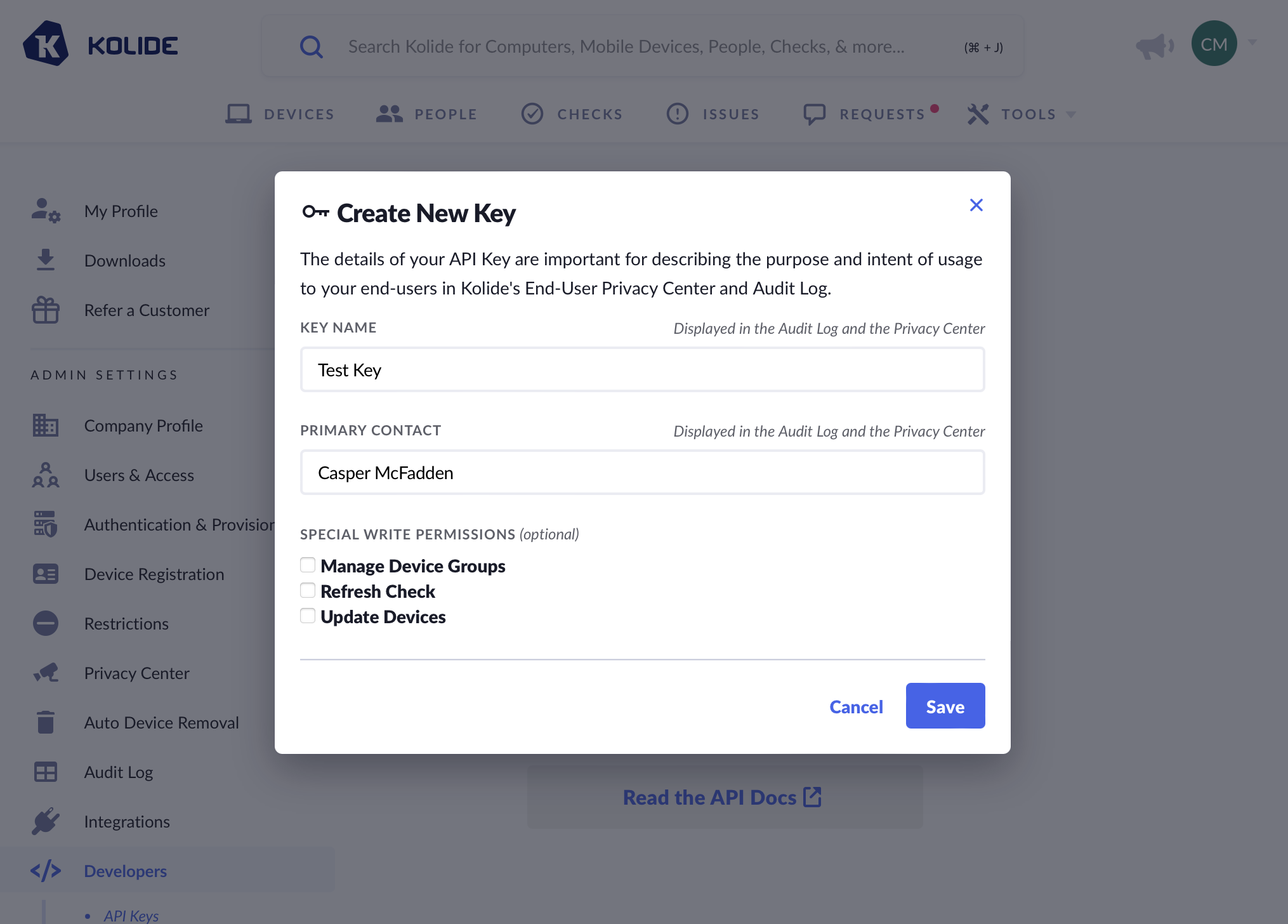
If available, select any special write permissions you’d like to grant to this specific key.
Click Save.
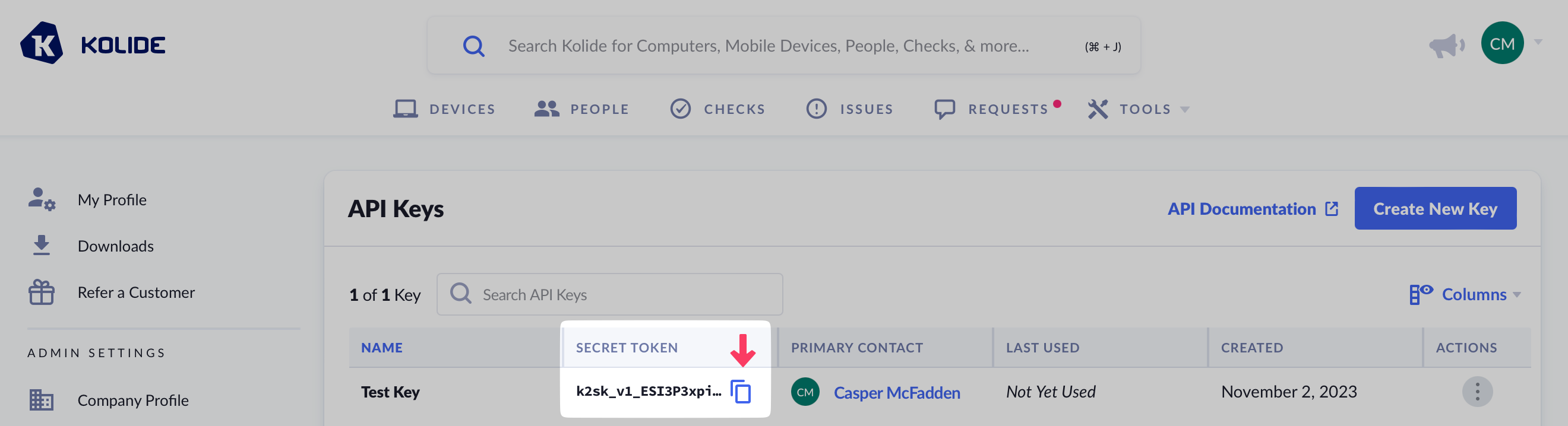
Once saved, the secret token is available in the table. Click the duplicate button to copy the token to your clipboard.
Note
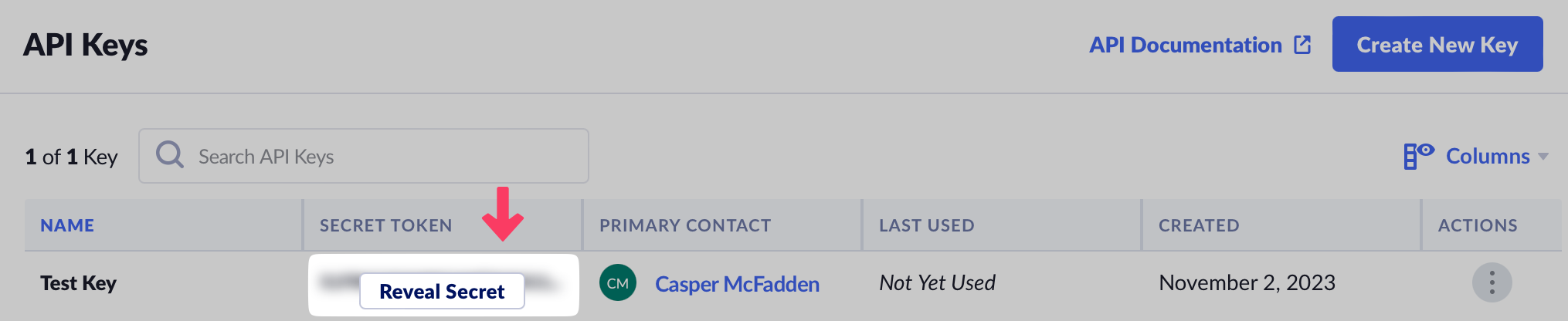
The secret token can be accessed by any Device Trust admins with “Full Access”. To do so, they must click the Reveal Secret button, and the action will be logged in the Device Trust audit log.
Authentication
The Device Trust REST API uses token-based authentication. To obtain a token, first create an API Key.
Pass the token through the Authorization header on each request (see the example below).
API version header
The X-Kolide-Api-Version header is optional. If it is not specified, Device Trust will
default to the latest API version. To make sure consistent responses when new API
versions are released, clients are recommended to include the version header with
each request. The current API version is 2026-04-07.
An example request using curl:
curl -H "Content-Type: application/json" \
     -H "X-Kolide-Api-Version: 2026-04-07" \
     -H "Authorization: Bearer $KOLIDE_API_TOKEN" \
     "https://api.kolide.com/audit_logs"
An example JSON response for the above request:
{
  "data": [...],
  "pagination": {
    "next": "https://api.kolide.com/audit_logs?per_page=2&cursor=DOscDOc=",
    "next_cursor": "DOscDOc=",
    "current_cursor": "",
    "count": 2
  }
}
Pagination
The Device Trust API uses a cursor-based pagination strategy.
On any endpoint that returns a list or collection of entities, you may supply a cursor URL query parameter to fetch records beyond the first page of results:
curl -H "Content-Type: application/json" \
     -H "X-Kolide-Api-Version: 2026-04-07" \
     -H "Authorization: Bearer $KOLIDEAPIKEY" \
     "https://api.kolide.com/audit_logs?per_page=25"
{
  "pagination": {
    "next": "https://api.kolide.com/audit_logs?per_page=25&cursor=ABCDJ",
    "next_cursor": "ABCDJ",
    "current_cursor": "JDCBA",
    "count": 25
  },
  "data": [...]
}
A request with a blank cursor parameter will return the first page of results.
The response has a pagination section that includes the cursor for the next page
of results. For your convenience, we also include a next attribute that is a
pre-built URL with the next cursor already specified. See the example above.
The default page length is 25 records, but you can include a per_page query
parameter to specify a different page length between 1 and 100.
If the values for cursor and next are blank, that indicates there are no more
records to display and that you have reached the last page.
API spec
Corresponding spec files for each Device Trust API version:
Code examples
Here are a couple more simple examples of API clients iterating through a list of records:
Ruby
require "uri"
require "net/http"
require "openssl"
require "json"

# Find your API key at:
# https://app.kolide.com/x/settings/admin/developers/api_keys

key = ENV.fetch("APIKEY", "")
next_url = "https://api.kolide.com/audit_logs?per_page=25&cursor="
more_records = true
results = []

while more_records do
  url = URI(next_url)
  http = Net::HTTP.new(url.host, url.port)
  http.use_ssl = true

  request = Net::HTTP::Get.new(url)
  request["accept"] = "application/json"
  request["Authorization"] = "Bearer #{key}"
  request["X-Kolide-API-Version"] = "2026-04-07"

  response = http.request(request)

  case response
  when Net::HTTPSuccess then
    resp = JSON.parse(response.read_body)
    next_url = resp["pagination"]["next"]
    results += resp["data"]
    more_records = next_url.to_s != ""
  else
    more_records = false
    puts "Unexpected response code: #{ response.code }"
  end
end

puts results
Javascript
const https = require("https");

// Find your API key at:
// https://app.kolide.com/x/settings/admin/developers/api_keys
const api_key = process.env.APIKEY;

function fetchRecords(url) {
  return new Promise((resolve, reject) => {
    let options = {
      method: "GET",
      headers: {
        accept: "application/json",
        authorization: "Bearer " + api_key,
        "x-kolide-api-version": "2026-04-07",
      },
    };

    const req = https.request(url, options, (res) => {
      let data = "";
      res.on("data", (chunk) => {
        data += chunk;
      });

      res.on("end", () => {
        if (res.statusCode !== 200) {
          reject("Error response: " + res.statusCode);
        } else {
          resolve(data);
        }
      });
    });
    req.on("error", (error) => {
      reject(error);
    });

    req.end();
  });
}

async function getAllRecords() {
  let moreRecords = true;
  let url = "https://api.kolide.com/devices?cursor=";
  let records = [];

  while (moreRecords == true) {
    try {
      let response = await fetchRecords(url);
      let resp = JSON.parse(response);
      records = records.concat(resp["data"]);
      let nextUrl = resp["pagination"]["next"];
      if (nextUrl != "" && nextUrl != null) {
        moreRecords = true;
        url = nextUrl;
      } else {
        moreRecords = false;
      }
    } catch (error) {
      console.error("ERROR:");
      console.error(error);
      moreRecords = false;
    }
  }

  console.log(records);
}

getAllRecords();
Search
Some list-style API endpoints support search. The endpoints that support search
will have a query request parameter described in the API reference documentation
for that endpoint. A search query is specified by adding a query parameter to
the request URL.
The general syntax for specifying a search query is:
<field><operator><value>
<field>is the name of the attribute on the entity that you wish to search or filter by. The searchable fields are listed in the API reference documentation for each endpoint.<operator>must be safely url-encoded, and may be one of the following::(exact match)~(substring match)>(greater than) only supported for datetime fields<(less than) only supported for datetime fields
<value>is the value you wish to compare against. It must be quoted with double-quotes (") if it contains spaces.
For example, to search for people with an email containing the string
@example.com, you would use the following query:
api.kolide.com/people?query=email~"@example.com"
To search for all issues that were detected before/after a certain datetime, you would use the following queries:
api.kolide.com/issues?query=detected_at%3C"2021-01-01T09:31:04Z"
and
api.kolide.com/issues?query=detected_at%3E"2021-01-01T09:31:04Z"
Note that timestamp values should be formatted using the ISO8601 format, and
should quoted with double-quotes (").
Multiple search clauses can be combined with AND and OR. To expand on the examples above, if you wanted to find all the issues that were resolved within a certain time period, you could combine a resolved_at> search clause with a resolved_at< search clause:
api.kolide.com/issues?query=resolved_at>"2021-01-01T09:31:04Z" AND resolved_at<"2021-01-31T23:59:59"
url-encoded, this url would be:
api.kolide.com/issues?query=resolved_at%3E%222021-01-01T09:31:04Z%22%20AND%20resolved_at%3C%222021-01-31T23:59:59%22
Special write permissions
By default, all API Keys only have access to read-only endpoints. If you want a key to make changes to the Device Trust system, you must first grant it individual write permissions.
Tip
Premium Feature
Write API access is only available for customers who are subscribed to Kolide Max. For more information and how to upgrade, see Unified Access Pro pricing or contact 1Password Device Trust support to upgrade.
When granting a key write permissions, you must also provide a rationale for why the permission is needed. This provides necessary information other administrators and end-users can use to understand why internal apps or processes are using a specific permission.
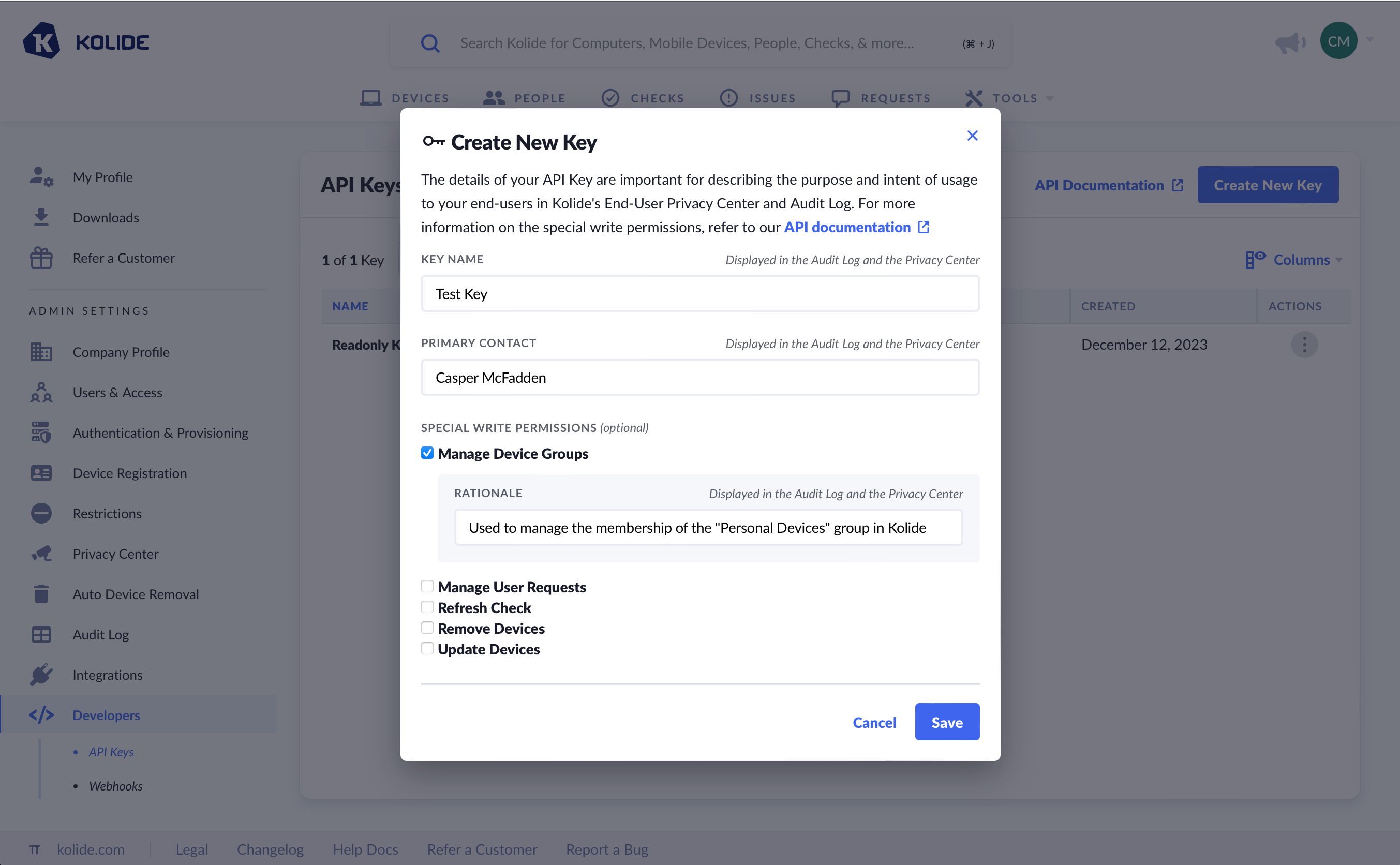
The following is a complete list of permissions:
Remove devices
Added On: January 15th, 2024
Description: Allows an API Key to unregister and delete devices from Device Trust
API Endpoints:
DELETE https://api.kolide.com/devices/{deviceId}/registrationDELETE https://api.kolide.com/devices/{deviceId}
Manage user requests
Added On: December 21st, 2023
Description: Allows an API Key to approve or deny end-user issue exemption requests and device registration requests
API Endpoints:
PATCH https://api.kolide.com/exemption_requests/{id}PATCH https://api.kolide.com/registration_requests/{id}
Manage device groups
Added On: August 31st, 2023
Description: Allows an API Key to add or remove devices from Device Groups.
API Endpoints:
POST https://api.kolide.com/device_groups/{deviceGroupId}/membershipsDELETE https://api.kolide.com/device_groups/{deviceGroupId}/memberships/{id}
Refresh check
Added On: November 1st, 2023
Description: Allows an API Key to re-run a Device Trust Check on devices enrolled in Device Trust.
API Endpoints:
Update devices
Added On: November 1st, 2023
Description: Allows an API Key to edit the configuration of devices.
API Endpoints:
Create live query
Added On: June 3rd, 2024
Description: Allows an API Key to create a Live Query.
API Endpoints:
POST https://api.kolide.com/live_query_campaignsPATCH https://api.kolide.com/live_query_campaigns/{id}
Usage limits
Device Trust’s API supports a maximum of 270 requests per minute. When this limit is exceeded, Device Trust will return a HTTP status code 429 (Too Many Requests). In this 429 request, Device Trust will include headers that adhere to the RateLimit Header Fields for HTTP draft standard.
Here is the example of the headers Device Trust will send when your client exceeds the usage limits.
HTTP/1.1 429 Too Many Requests
Content-Type: application/json
Retry-After: 20
RateLimit-Limit: 15
Ratelimit-Remaining: 0
Ratelimit-Reset: 1698610800
Note: Even if you do not think you will hit the rate-limits, we suggest implementing logic that takes into account the rate-limit headers for all API calls. If you receive a 429, we recommend an exponential backoff of your requests.
This makes sure that even when you hit a rate-limit, it is handled accordingly and there are no interruptions to your business.
API token format
The format for Device Trust API keys is as follows:
$PREFIX_$VERSION_$SECRET
This predictable format allows code-scanning tools like semgrep to detect when a secret has accidentally been committed to your version control system of choice and need to be rotated.
The value for $PREFIX is currently: k2sk
An example key will look something like: k2sk_v1_A2UYhW7OPt2jKKLqmFcaGNK7
By accessing or using 1Password Developer Tools, you agree to the API and SDK Terms of Service.
Was this article helpful?
Glad to hear it! If you have anything you'd like to add, feel free to contact us.
Sorry to hear that. Please contact us if you'd like to provide more details.