With app discovery, 1Password can identify work-related applications across vaults in a business account and includes them in reports available through 1Password SaaS Manager. This gives administrators better visibility into the work apps team members are using.
App discovery is designed to provide you with useful insights while upholding 1Password’s commitment to user privacy and data security.
To turn on app discovery, sign in to your account on 1Password.com, select Policies in the sidebar, and choose Sharing and permissions. Then turn on Discover work apps under the “Reports” policy and select Save.
Technical design
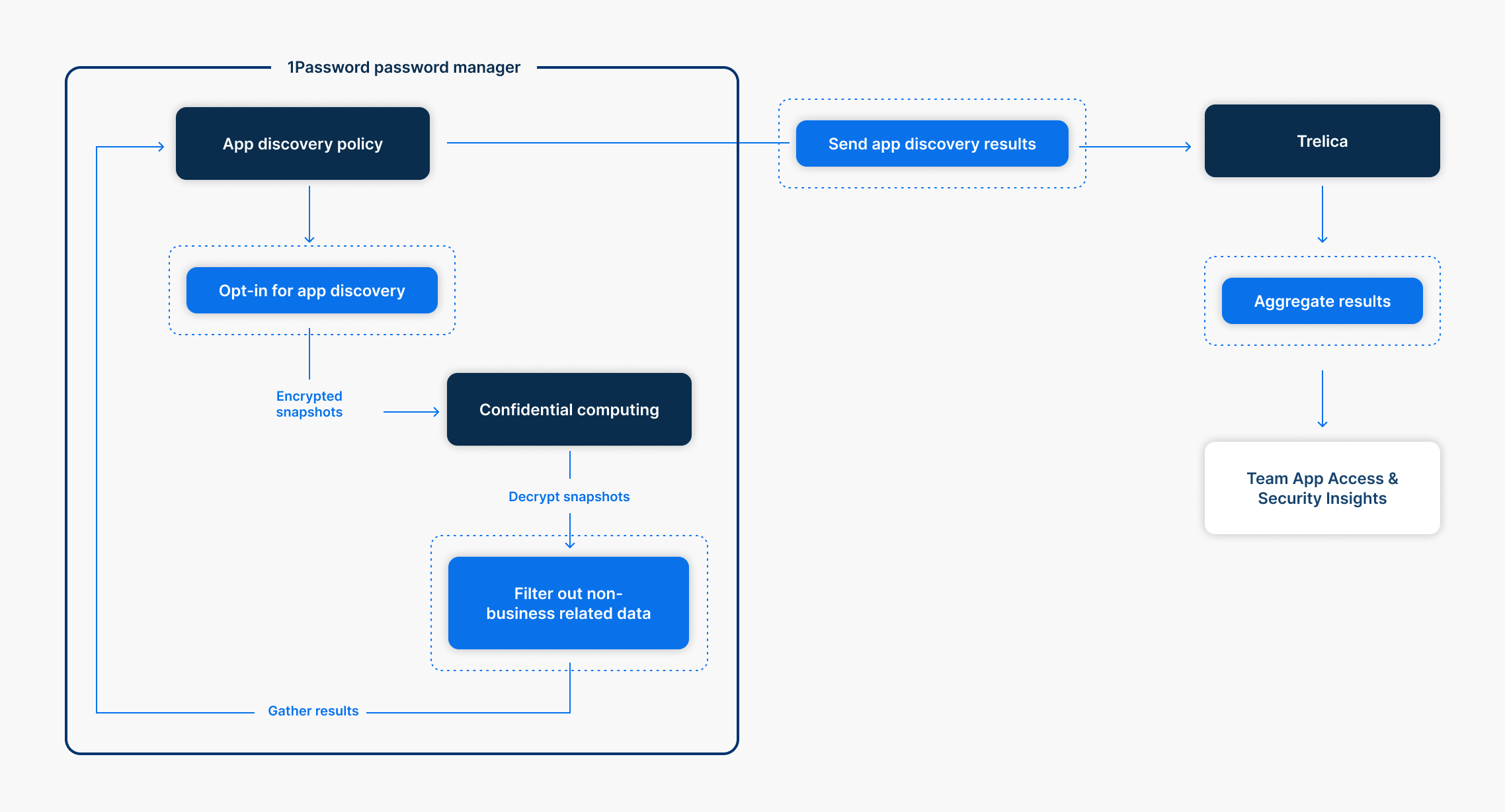
When you turn on “Discover work apps”, 1Password generates a keyset that contains a public and private key, specific to app discovery.
If you’re signed in to 1Password and app discovery is turned on, the 1Password clients will automatically generate encrypted snapshots that contain limited information about vault items. The public key is used by 1Password clients to encrypt snapshots of vault items before they’re sent to the 1Password server.
The confidential computing service within 1Password’s infrastructure uses the private key to decrypt snapshots, filter snapshot information, and send work-related application results to SaaS Manager.
Security model
To maintain the privacy and security of vault items, snapshots never contain password credentials. Encrypted snapshot information includes item titles, usernames, websites, Watchtower alerts, and vault names.
Snapshot information is encrypted with the ChaCha20-Poly1305 key, then encrypted with HPKE using the x25519 public key.
With confidential computing, your data and private key are secured inside a special, isolated environment called an “enclave.” Confidential computing creates this tightly controlled enclave for your data, ensuring that it remains private and secure when processed. Learn more about the security of 1Password confidential computing.
Risk considerations
Snapshots only include information collected from 1Password vaults within a business account. If a team member is signed in to an individual or family account, their personal account vault information will never be collected with app discovery.
1Password helps minimize the risk of team members storing personal information in their Employee vaults with in-app communication and by limiting the information presented in vault reports. You can take steps to communicate that your team’s 1Password account should not be used to store personal information.